
PowerForm™ offers customized workflow options tailored to your business's unique requirements.
Task creation
The system supports task creation through encoding or uploading.
- Single task creation through encoding using the web portal.
- Multiple task creation on the web portal by uploading a CSV file or importing data from the enterprise system.
- After creation, tasks are automatically forwarded to either the Verifier or the Dispatcher.


Verification
The Verifier is responsible for checking the accuracy of data and may edit the information before sending the task to the Dispatcher or Reviewer.
- Tasks under verification can be assigned to a specific Verifier agent.
- This step can be skipped, and tasks can be forwarded directly by the Encoder to the Dispatcher.
Dispatch
The Dispatcher is responsible for assigning tasks to field agents.
- Task assignments can be assigned individually or in batches to field agents.
- Real-time dispatches and updates are synced immediately to field agents on their mobile devices, provided they have a stable internet connection.


Mobile App Task Completion
Field agents complete task forms using their mobile devices.
- Username, password, and OTP verification for a secure login.
- Dedicated screen for task creation on the mobile app.
- Separate screen for accessing web-dispatched tasks.
- Mobile app can record electronic signatures and photos.
Mobile App Task Submission
Tasks can be submitted anytime and anywhere using the mobile device.
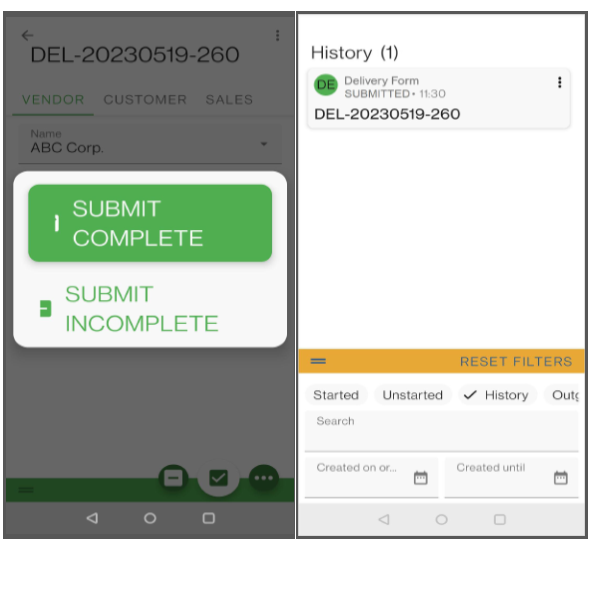
- Full and partial task submissions are supported. Partially submitted tasks will be sent to the Dispatcher for reassignment.
- Tasks can be submitted even without a mobile data connection. They will remain in the “pending sync” tab until the server receives them.
- Field agents can retain a history of their submitted tasks.

Task Review and Task Approval
Submitted tasks are automatically routed to the Reviewer or Approver.
- The system supports multiple levels of reviewers and approvers.
- The number of reviews and approvals can be configured to have different levels. There can be more than one level of approval, and several approvers can be assigned on each level.
- The review and approval workflows can have automatic routing for improved process compliance.
- The Approval stage marks the end of the task’s workflow cycle.
Intelligent workflow automation for organizational efficiency
Create a sequential path for data to follow and automate repetitive processes and tasks throughout the organization with intelligent workflows.
Workflow assignment
Assign sections of the workflow to team members based on their work responsibilities to lessen the back-and-forth exchange of emails, establish accountability, and simplify task delegation.
Automatic creation of task
In addition to manually creating tasks through individual input or CSV upload, a new task can be generated based on the previous action taken (such as task submission or status change). It is also possible for the system to automatically assign the task to another user or send it for pre-approval to team leads.
Dynamic routing
The workflow logic determines form routing based on the collected data, and it also has the ability to send forms back for corrections, permit forms to skip steps, or mark incomplete forms for follow-up.
Multi-level reviews and approval
Configure multiple levels for the number of reviews and approval processes to ensure that forms undergo a thorough review before granting final approval.
Sync data with third-party systems
Automatically route completed form information to your CRM, ERP, or legacy systems and enable seamless data flow across different systems.
Notifications and Reminders
Set reminders and escalations for each step of the workflow to prevent forms from getting stuck at a particular stage. This will enable users to receive notifications based on their email address, mobile number, or system role.
Supported Implementation
You can choose to deploy and access PowerForm in a way that suits your requirements. Whether you prefer to access the application on your server (On-premise) or on the cloud, the choice is entirely up to you.
Cloud Implementation
Deploying a cloud-hosted implementation involves using a cloud hosting provider that will take care of maintaining the software and hardware, making it an ideal setup for companies without a dedicated IT group. This approach offers several advantages, including:
- No need to acquire new infrastructure such as servers
- Pay-as-you-use model, with no upfront cost
- Reduced IT staff responsibilities
- Regular data backups are performed
- Quick deployment process.


On-Premise
On-premise installations reside on dedicated servers maintained by an organization’s IT department. This provides additional control and validation. However, setting up this infrastructure requires additional hardware and a dedicated IT staff for management. This approach offers several advantages, including
- This approach allows for additional control and validation over all systems and data, while providing improved visibility into processes.
- Corporate data is stored and handled internally, within the company firewall, and managed exclusively by security experts.
- Maintaining the hardware requires a dedicated IT staff for maintenance and support.
- While the initial investment may be modest, the long-term payoff can be substantial.
- Offers greater customization options, which can lead to increased process efficiency and higher team efficiency.